Table Of Contents
- Step 1: Choose the Right Display for Your Café Space
- Step 2: Add a Media Player if Needed
- Step 3: Connect Your Screen to PosterBooking
- Step 4: Design Your Digital Menu Content
- Step 5: Upload Your Menu to PosterBooking
- Step 6: Create a Playlist for Your Menu
- Step 7: Assign the Playlist to Your Screen
- Step 8: Automate Menus Based on Time of Day
- Step 9: Keep Your Menus Fresh and Timely
- Why PosterBooking is Perfect for Café Menu Boards in 2025
- Final Thoughts
Running a café in 2025 means staying flexible, visually appealing, and easy to update. Whether you’re displaying your espresso offerings, seasonal specials, or pastries of the day, digital menu boards make your café feel more modern and professional while saving time and printing costs.
The best part is that you can create and manage a digital menu system with just a screen, internet connection, and a free digital signage platform like PosterBooking. It is simple to set up, even if you have no technical background, and it gives you full control of your menu content in real time.
This guide will take you through the entire process of setting up a digital menu board tailored specifically for café environments.
Create an Account Today and Get 10 screens free for 3 months!
Step 1: Choose the Right Display for Your Café Space
Start by picking a screen that fits naturally into your café’s layout. You want it to be easy to read from a short distance and ideally mounted behind the counter or near the ordering area.
Options include:
- Smart TVs which are affordable, widely available, and compatible with signage apps
- Commercial displays for longer operating hours and brighter visibility in daylight
- Tablets or small screens for tight spaces or tabletop menus
A 32-to-43-inch screen is often ideal for small to medium cafés. For larger spaces or multiple zones, you might consider using more than one screen.
Step 2: Add a Media Player if Needed
If your screen is not a smart TV or does not support apps directly, you will need a small media player. These devices allow your screen to display content through cloud-based signage platforms.
Popular choices include:
- Amazon Fire Stick for easy plug-in and setup
- Raspberry Pi for a budget-friendly and DIY approach
- Android TV boxes for more customization
Plug your media player into the HDMI port, connect it to power, and get it online through Wi-Fi or Ethernet.
Step 3: Connect Your Screen to PosterBooking
PosterBooking is a free digital signage software built for businesses like cafés. It allows you to upload your menus, create playlists, and manage everything from your phone or laptop.
Here’s how to set it up:
- On your Fire Stick or smart device, download and open the PosterBooking app
- A unique screen code will appear
- Go to Posterbooking.com on your phone or computer
- Create a free account or sign in
- Click Add Screen and enter the screen code
- Give your screen a name like “Main Counter Menu” and click Add Screen
Your café’s screen is now connected and ready for digital menu content.
Step 4: Design Your Digital Menu Content
Design your café menu in a clean, visual way. Highlight bestsellers like lattes, croissants, and signature drinks. You can use tools like Canva, Adobe Express, or PowerPoint to create images that showcase your offerings.
Best practices for design include:
- Use a simple, legible font
- Organize menu items by category like Coffee, Tea, Bakery, or Breakfast
- Include pricing and key details without clutter
- Use images to show your most visually appealing items
- Stick to a resolution of 1920 by 1080 pixels for horizontal screens or 1080 by 1920 for vertical ones
Save your design as a JPG, PNG, or MP4 video depending on how you want it displayed.
Step 5: Upload Your Menu to PosterBooking
Once your designs are ready, it is time to upload them to your PosterBooking account.
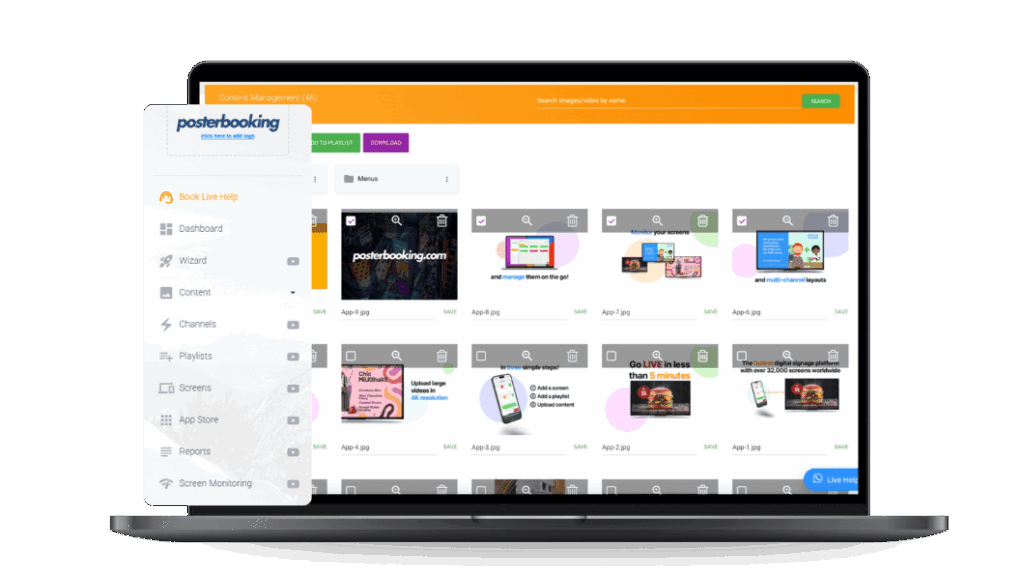
- In the PosterBooking dashboard, go to Content
- Click Upload and select your menu files
- Organize files into folders if you have multiple menus for different times or offerings
- Save your uploads
PosterBooking supports unlimited uploads so you can keep different menus for breakfast, brunch, or weekend specials ready to go.
Don’t Miss Out! Get Access to PosterBooking Now!
Step 6: Create a Playlist for Your Menu
A playlist is a collection of menu items that play in sequence. This is perfect if you want to rotate through different screens such as drinks, food, and promotions.
- Go to the Playlists section in the dashboard
- Click Create Playlist and name it something like “Café Menu” or “Morning Specials”
- Click Add Content and select your uploaded files
- Choose the display duration for each screen, for example 10 to 15 seconds
- Save your playlist
You can always come back and update your playlist when you change your offerings.
Step 7: Assign the Playlist to Your Screen
Now it is time to display your new menu.
- Go to Screens in the dashboard
- Under your connected screen, click Add or Edit Playlist
- Select your café menu playlist
- Click Save
Your screen will immediately begin displaying your digital menu board.
Step 8: Automate Menus Based on Time of Day
If your café has different menus throughout the day, PosterBooking allows you to schedule each playlist so that your content changes automatically.
- Create multiple playlists like “Morning Menu” and “Afternoon Menu”
- Use the Schedule tool to set display times for each
- Assign the schedule to your screen
This way, you can show breakfast items in the morning and lunch specials later without manual updates.
Step 9: Keep Your Menus Fresh and Timely
Update your content as often as you change your menu. If you rotate pastries daily or run weekly drink specials, simply log into PosterBooking, upload your new image or video, and update the playlist.
Your screen will reflect the changes right away, keeping your presentation accurate and professional.
Why PosterBooking is Perfect for Café Menu Boards in 2025
PosterBooking is one of the best digital signage platforms available today, especially for small and growing café businesses.
Here is why it stands out:
- It is completely free to use with no subscription required
- You can connect up to 10 screens at no cost
- Easy content scheduling for morning and afternoon menus
- Works with common devices like Fire Stick, Android TV, and Raspberry Pi
- Control all your content from any computer or smartphone
It is a practical and affordable solution for cafés that want a modern look without technical complications.
Final Thoughts
A digital menu board brings flexibility, style, and convenience to your café. Whether you are serving espresso shots and bagels or smoothies and sandwiches, a digital display helps you show off your offerings clearly and professionally.
With the help of PosterBooking, you can set up your café’s digital menu in under an hour, manage it from anywhere, and keep your customers informed and engaged with every update.
To get started, visit posterbooking.com and create your free account today. Your digital menu board is just a few clicks away.