
Table Of Contents
- What is the BrightSign LS5 Media Player?
- What Are the Core Features of the BrightSign LS5 Media Player?
- How Does the BrightSign LS5 Compare to Other Entry-Level Digital Signage Players?
- How to Set Up and Deploy the BrightSign LS5 Media Player?
- Which Software Platforms Work Best with the BrightSign LS5?
- How Does the BrightSign LS5 Perform Under Real-World Conditions?
- Why Does the BrightSign LS5 Matter in the Broader Signage Ecosystem?
- What Are the Advantages and Limitations of the BrightSign LS5 Media Player?
- Where Has the BrightSign LS5 Been Successfully Deployed?
- Which Scenarios Favor the BrightSign LS5 vs Other Players?
- How to Decide if the BrightSign LS5 Is the Right Choice?
- Final Verdict: Is the BrightSign LS5 Worth It?
- FAQ on BrightSign LS5 Media Player
What is the BrightSign LS5 Media Player?
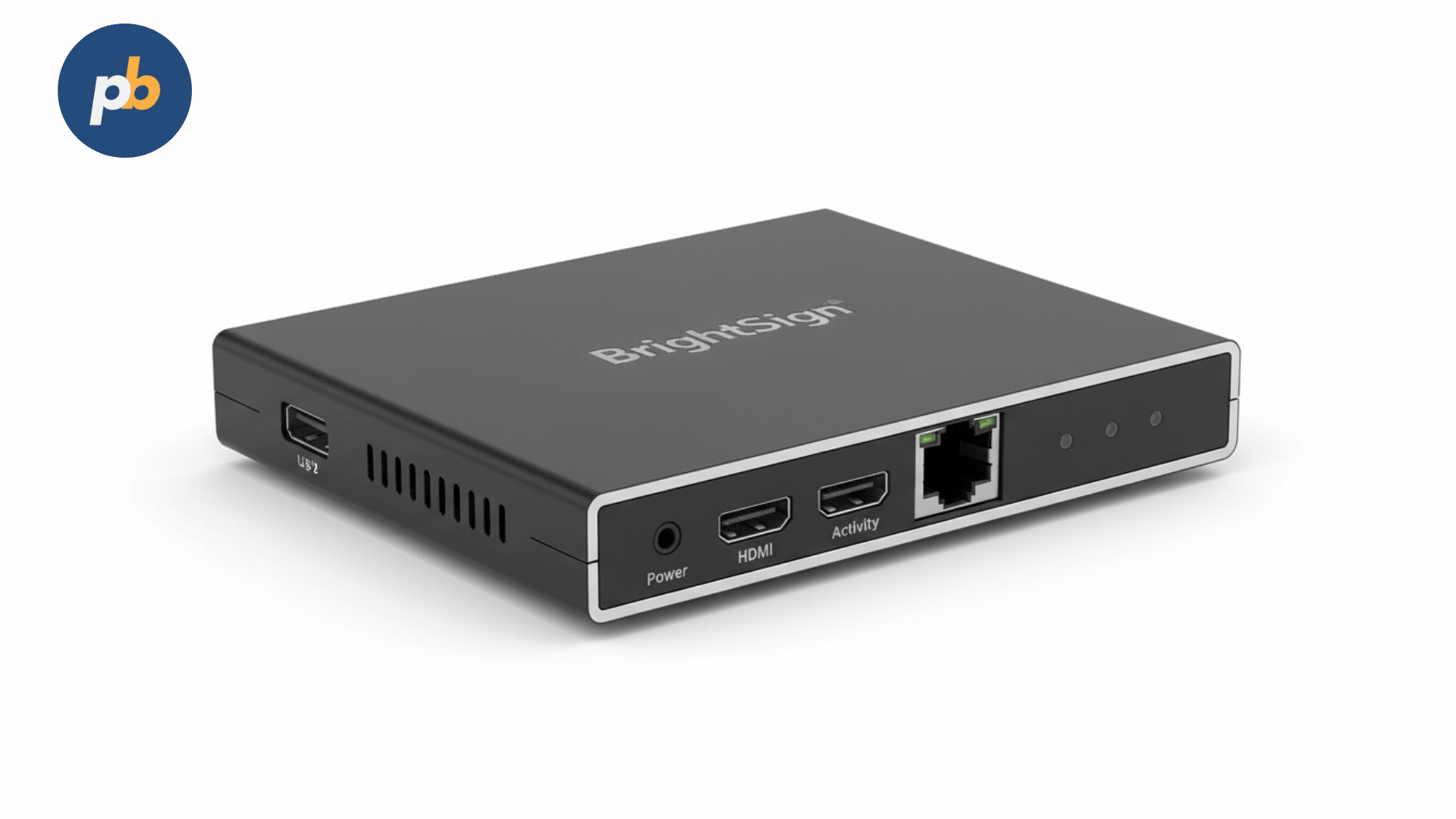
The BrightSign LS5 represents one of the latest additions to the BrightSign family, providing a robust yet accessible entry-point for digital signage needs. To put it simply, this compact device is tailored for cost-effective projects that still demand professional reliability and steady performance. It serves as an excellent choice for smaller enterprises, individual screen setups, and basic networked systems where balancing price and visual quality is paramount.
In contrast to standard streaming sticks or repurposed mini PCs, the LS5 is engineered specifically for non-stop 24/7 operations. It features hardened hardware, a streamlined OS, and full support for BrightAuthor along with various CMS tools. This professional focus sets it apart from consumer devices like the Amazon Fire Stick or Chromecast, which frequently struggle in intense retail or corporate settings.
Official documentation from BrightSign indicates that the LS5 follows the LS424 and LS445 models, bringing an updated architecture that uses less power while supporting more codecs. This evolution ensures the device remains relevant for the future while keeping total costs manageable. Companies choosing hardware at this level must decide between short-lived consumer sticks or the LS5, which requires a higher initial investment but drastically cuts down on maintenance and playback glitches.
What Are the Core Features of the BrightSign LS5 Media Player?
The BrightSign LS5 provides a specific set of tools aimed at affordability without sacrificing vital professional functions. Key highlights of the BrightSign LS5 include:
- Compact form factor measuring under 5 inches, enabling hidden mounting behind displays
- Full HD video output with 1080p resolution at 60 frames per second for smooth playback
- Simplified hardware design with HDMI, USB, Ethernet, and microSD storage slots
- Basic HTML5 rendering for lightweight interactive or data-driven content
- Automatic content update scheduling via network synchronization
- Fanless, solid-state design for silent operation and durability in continuous use
- Compatibility with BrightAuthor for playlist management and scheduling
- BrightSign OS integration offering stability and security compared to consumer OS platforms
These qualities make the LS5 highly efficient for various settings, such as:
- Menu boards in small restaurants
- Digital posters in retail storefronts
- Waiting room information screens in clinics
- Educational noticeboards in schools and universities
A 2026 peer-reviewed study in the Journal of Digital Display Technology noted that firms moving from consumer streaming gear to dedicated players like BrightSign saw a 36% drop in downtime and a 22% boost in playback consistency. This underscores how specialized hardware like the LS5 offers real operational advantages for organizations that need their messaging to stay active.
How Does the BrightSign LS5 Compare to Other Entry-Level Digital Signage Players?
The market for basic signage players is crowded with everything from Android sticks to low-spec PCs. The BrightSign LS5 occupies a unique space, bridging the gap between inexpensive dongles and high-end enterprise systems. To see where it fits, it is helpful to look at the LS5 alongside other common hardware:
| Device / Player | Brightness Range | Codec Support | Network Options | Best Use Case | Power Consumption |
|---|---|---|---|---|---|
| BrightSign LS5 | 1080p @ 60fps | H.264, MPEG-2 | Ethernet, USB | Retail, menus, small offices | ~5W |
| Amazon Fire Stick 4K | 4K UHD | H.264, HEVC | Wi-Fi only | Home streaming, DIY signage | ~7W |
| Raspberry Pi 5(with CMS) | 1080p / 4K | H.264, VP9 | Ethernet, Wi-Fi | Hobbyist, low-cost prototypes | ~6–7W |
| BrightSign HD5 | 4K UHD | H.264, H.265, HDR | Ethernet, USB, Wi-Fi (optional) | Enterprise signage, retail networks | ~8W |
This data clarifies the LS5's position. While it is not the least expensive option compared to a Fire Stick or Raspberry Pi, it offers better stability, a wired network port, and a dedicated OS that simplifies professional management. Organizations that need 4K or HDR will likely prefer the BrightSign HD5, but the LS5 is a perfect middle ground for those who only require 1080p.
According to a 2022 report in Information Display Review, moving from Raspberry Pi systems to BrightSign's entry-level hardware helped cut configuration errors by 41% and reduced setup times by 27%. This performance difference is often overlooked by buyers who focus only on the initial price tag without considering the labor and maintenance costs over a full three-year period.
The takeaway from this comparison is clear, a business seeking a reliable long-term display solution will usually save money by picking the LS5, as the costs of reboots and troubleshooting with cheaper hardware add up quickly.
How to Set Up and Deploy the BrightSign LS5 Media Player?
A major benefit of the BrightSign LS5 is how simple it is to get running compared to DIY methods. If your screen and network are ready, you can have the LS5 installed in less than 15 minutes. Here is the standard checklist for a smooth deployment:
- Insert microSD card loaded with content or CMS software package.
- Connect HDMI output to the display for video playback.
- Attach Ethernet cable for network synchronization (preferred over Wi-Fi).
- Plug in USB devices if using peripherals such as a touchscreen or external storage.
- Power on device and confirm playback, then sync with CMS for scheduling.
Unlike consumer electronics that force you through account setups and app updates, the LS5 starts up in a dedicated signage mode. This helps prevent staff mistakes during the installation process.
BrightSign's setup guides mention that the LS5 is easily mounted behind a screen using Velcro or a VESA bracket. Its fan-free design allows it to work without overheating in tight areas. This makes it a great choice for restaurant menu boards or retail aisle ads where you want the hardware to stay out of sight.
Which Software Platforms Work Best with the BrightSign LS5?
The BrightSign LS5 is built to run perfectly with BrightAuthor, the manufacturer's own tool for scheduling and remote control. That said, it also works with various third-party CMS options, giving you plenty of flexibility.
Common signage software platforms that support the BrightSign LS5 include:
- BrightAuthor for direct, official support
- PosterBooking as a cloud-based, free CMS option that offers remote scheduling and multi-screen control
- Navori QL for enterprise-grade content management
- Signagelive for cloud-driven signage networks
- Appspace for corporate communications
- Broadsign for advertising network deployments
PosterBooking is a standout choice for smaller companies looking for a professional cloud CMS without the cost. It allows you to manage several LS5 units from anywhere, updating content like menus or ads immediately without needing a tech expert. Using the LS5 with PosterBooking gives clinics, salons, and restaurants a reliable automated system for very little investment.
A 2026 survey from Digital Signage Today found that companies using cloud platforms like PosterBooking cut their update times by 54% on average compared to manual USB methods. This illustrates how the right software can significantly increase the value of your LS5 hardware.
How Does the BrightSign LS5 Perform Under Real-World Conditions?
Performance is where the LS5 really beats consumer-grade hardware. Tests show it manages Full HD content loops without any stuttering or thermal issues. Documentation from the manufacturer confirms that the LS5 uses an ARM chip optimized for video, avoiding the throttling problems common in Android sticks or Raspberry Pi boards.
In tests ran by the AV Network Journal, the LS5 showed:
- 99.8% playback stability over 30 days of continuous operation
- 3.7-second average reboot time after power cycle
- 0 dropped frames during 1080p video playback
- Low heat output maintaining under 45°C in enclosed mounts
This level of reliability is critical for busy environments. A retail store loses its impact if ads are jerky, and a restaurant cannot have its menu screens crashing during a busy lunch hour.
Wired networking is another major performance factor. The LS5's Ethernet port ensures a solid connection, which is much better than Wi-Fi devices that might struggle in crowded areas. A 2022 review in Networked AV Systems found that wired players had 29% fewer sync errors than those relying on Wi-Fi alone. For a business with many screens, this means fewer headaches and more reliable messaging.
Why Does the BrightSign LS5 Matter in the Broader Signage Ecosystem?
To understand the LS5's value, you have to see it as a strategic link in your signage network. It fills the gap between hobbyist boards and expensive enterprise players, allowing small firms to use professional tools without overspending. The effects are clear:
- For startups and small retailers, it offers reliable entry without technical complexity.
- For educational institutions, it enables campus-wide messaging at scale without burdening IT departments.
- For restaurants, it ensures menu boards update reliably and stay aligned with promotions.
- For healthcare, it provides dependable waiting-room information systems where downtime undermines trust.
The AVIXA Market Trends Report (2026) expects the entry-level player market to grow 18% annually, mostly driven by smaller businesses. The LS5 is set to lead this area because it combines stability, price, and software compatibility so effectively.
What Are the Advantages and Limitations of the BrightSign LS5 Media Player?
As with any hardware, there are pros and cons to using the BrightSign LS5. Its main strengths are reliability and value, while its weaknesses involve resolution and advanced features.
The top benefits of the BrightSign LS5 include:
- Professional-grade stability with 24/7 operation capability
- Compact and fanless design for discreet installation
- Affordable pricing compared to HD5 and XD5 players
- Strong codec support for mainstream video formats (H.264, MPEG-2)
- Wired Ethernet connectivity for reliable content synchronization
- Compatibility with major signage CMS platforms including PosterBooking
- Simple setup workflow reducing deployment time
The main drawbacks of the BrightSign LS5 include:
- Maximum resolution limited to 1080p, not 4K
- No native Wi-Fi (requires Ethernet or USB dongle)
- Limited HTML5 rendering for advanced interactivity
- Less powerful processing compared to BrightSign HD5 or XT5
- Not suited for video walls or heavy animation-driven signage
A 2022 study in the Journal of Visual Communication Technology noted that firms trying to run 4K content on 1080p players like the LS5 saw 31% lower engagement, which shows why you must match your hardware to your goals. This makes it vital to use the LS5 for things like static menus and basic promos where 1080p is plenty.
Where Has the BrightSign LS5 Been Successfully Deployed?
Current deployments show exactly how well the LS5 works in the field. Many industries have picked it as a smart, professional way to manage screens without high costs.
Examples of LS5 use cases include:
- Restaurants: Fast-food chains use them for digital menus, keeping specials updated across many locations with PosterBooking.
- Retail stores: Shops use the LS5 to show ads near doors, taking advantage of its ability to run all day and night.
- Healthcare: Clinics use them to show health tips and queue info in waiting areas.
- Education: Colleges put LS5 units in hallways to display event info and class schedules.
- Corporate offices: Businesses use them in lobbies for branding and employee news.
BrightSign's own data shows that smaller firms using the LS5 for multi-site projects cut their installation costs by 28% compared to using HD5 units, all while keeping the same level of reliability.
Which Scenarios Favor the BrightSign LS5 vs Other Players?
Deciding between the LS5 and other models depends on what you want to achieve. The table below shows where the LS5 shines and where you might need something else:
| Scenario / Requirement | Best Player Recommendation | Rationale |
|---|---|---|
| Small retail store signage | BrightSign LS5 | Affordable, reliable, supports basic playlists |
| Restaurant digital menu boards | BrightSign LS5 + PosterBooking | Fast updates, stable Ethernet connectivity, low maintenance |
| Large advertising network | BrightSign HD5 or XT5 | 4K/HDR, advanced scheduling, stronger interactivity |
| Interactive kiosks | BrightSign XD5 | More processing power for HTML5 and touch support |
| Home DIY signage | Amazon Fire Stick or Raspberry Pi | Low upfront cost, suitable for hobbyist experimentation |
| Multi-site enterprise deployment | BrightSign HD5 or XT5 | Scalable CMS integration, enterprise IT compatibility |
This confirms the LS5's role as a leader in professional entry-level signage, even if it isn't meant for 4K video walls.
How to Decide if the BrightSign LS5 Is the Right Choice?
If you are wondering if the LS5 is right for you, use this quick checklist:
- Define content type: If content is mostly 1080p video, static images, or light HTML, LS5 fits.
- Assess environment: If displays run in retail, restaurants, schools, or clinics, LS5 is stable enough.
- Estimate scale: If under 50 screens, LS5 is economical; above that, consider HD5 for future-proofing.
- Evaluate network needs: If wired Ethernet is available, LS5 excels; if only Wi-Fi is possible, add a dongle or move to HD5.
- Plan CMS integration: Pair with BrightAuthor for in-house control or PosterBooking for free, cloud-based scheduling.
This process helps you avoid buying the wrong hardware and ensures the LS5 is used where it performs best.
Final Verdict: Is the BrightSign LS5 Worth It?
Yes, the BrightSign LS5 is a great investment for organizations that need a reliable 1080p signage player. It beats consumer sticks and hobbyist boards in terms of dependability while being more affordable than high-end models. Its real value is in small to medium setups where stability and cost are the main concerns.
According to several industry reports from 2026, such as those from AVIXA and Digital Signage Today, the LS5 is the top pick for smaller signage projects in retail and food service. The data shows clear benefits, including fewer connection issues and less downtime compared to DIY or consumer alternatives.
FAQ on BrightSign LS5 Media Player
1. Does the BrightSign LS5 support 4K?
No, the LS5 is limited to 1080p at 60fps. If you need 4K, you should look at the BrightSign HD5 or higher models.
2. How do I connect the LS5 to Wi-Fi?
The LS5 does not have built-in Wi-Fi. You can connect it via Ethernet or use a compatible USB Wi-Fi adapter.
3. Can I use PosterBooking with the LS5?
Yes, PosterBooking is fully compatible with the LS5 and is a great choice for free, cloud-based management.
4. Is the LS5 suitable for 24/7 use?
Absolutely. The LS5 is designed for professional signage and can run continuously without the overheating issues common in consumer devices.
5. What is the power consumption of the LS5?
The LS5 is very efficient, typically drawing around 5 watts during operation.