
Digital signage apps in 2025 deliver far more than playlists. they provide cloud CMS, player runtimes, and device management with analytics, integrations, and compliance baked in. The right choice balances cost, scale, integrations, and governance to ensure your network stays reliable and impactful.
Table Of Contents
- What Exactly Qualifies as a “Digital Signage App” in 2025?
- How Is a Signage App Different From Streaming, TV, or Presentation Software?
- How Did We Evaluate and Rank the Best Digital Signage Apps?
- What Data and Tests Should You Run During a Proof-of-Concept?
- Which Digital Signage App Is Best for Your Situation?
- What Is the Best Digital Signage App for a Single Screen or Microbusiness?
- What Is the Best Digital Signage App for Schools & Nonprofits?
- What Is the Best Digital Signage App for QSR Menus & Drive-Thru?
- What Is the Best Digital Signage App for Retail Promos & Shelf-Edge?
- What Is the Best Digital Signage App for Corporate Dashboards & KPI TVs?
- What Is the Best Digital Signage App for Churches & Community Boards?
- What Is the Best Digital Signage App for Events, Pop-Ups, and Temporary Installs?
- What Is the Best Digital Signage App for Android TV / Google TV Sticks?
- What Is the Best Digital Signage App for Raspberry Pi & Linux?
- What Is the Best Digital Signage App for Windows & macOS PCs?
- What Is the Best Digital Signage App for Interactive/Touch Kiosks?
- What Is the Best Digital Signage App for Video Walls & LED Walls?
- What Is the Best Digital Signage App for Multi-Location Franchises?
- What Is the Best Self-Hosted/Open-Source Digital Signage App?
- What Is the Best Digital Signage App for Low-Bandwidth or Offline-First?
- What Is the Best Digital Signage App for Privacy-Sensitive & Regulated Environments?
- How Do the Top Digital Signage Apps Compare Feature-by-Feature?
- Which Content Formats and Widgets Matter Most?
- What Scheduling, Rules, and Targeting Do You Actually Need?
- How Robust Are Device Management and Monitoring?
- What Security, Privacy, and Accessibility Practices Are Non-Negotiable?
- Which Platforms and Devices Do the Best Digital Signage Apps Support?
- How Does Software Choice Affect Hardware (SoC vs External)?
- What Deployment Model Should You Choose - Cloud, On-Prem, or Hybrid?
- How Do Pricing and True TCO Compare Across Leading Apps?
- When Is Upgrading or Paying More Actually Cheaper Long-Term?
- How Do You Implement a Signage App Properly From Pilot to Scale?
- What Should Your RFP and Scoring Rubric Include?
- What Common Mistakes Derail App Rollouts - and How Do You Avoid Them?
- What FAQs Do Buyers Ask About the Best Digital Signage Apps?
- Do I Need 4K or Is 1080p Fine?
- Can It Run Reliably Offline?
- Which OS Is Most Stable for 24/7 Use?
- How Do I Add Live Data Without Expensive Connectors?
- What About Accessibility and Captions?
- How Does Proof-of-Play Work?
- Which Apps Handle Video Walls?
- How Do I Migrate from My Current CMS?
- What Support/SLA Differences Matter?
What Exactly Qualifies as a “Digital Signage App” in 2025?
A digital signage app in 2025 qualifies as software that combines a content management system (CMS), a player runtime, and device management in a unified platform. Unlike a widget or template, which represent only creative assets or snippets, a signage app orchestrates scheduling, rules, playback, telemetry, and security across devices. Most apps are delivered as SaaS with mobile and desktop admin portals, though hybrid and on-prem options remain for compliance.
Table: Digital Signage Stack Components
| Component | Purpose | Used By |
|---|---|---|
| CMS | Upload, schedule, govern content | Admins, marketers |
| Network/CDN | Deliver content reliably | IT, operations |
| Player App | Decode and render | Screens, SoC, external players |
| Device Management | Monitor and remediate | IT, AV |
| Widgets/Templates | Speed creative output | Designers, editors |
Typical Outcomes of Digital Signage Apps include:
- Drive Awareness
- Manage Menu Boards
- Improve Wayfinding and Safety
- Support Compliance Messaging
- Display KPIs and Dashboards
How Is a Signage App Different From Streaming, TV, or Presentation Software?
A signage app differs from streaming and presentation platforms because it supports offline caching, multi-zone layouts, proof-of-play, device control, and emergency overrides, none of which are available in OTT or PowerPoint-style tools.
Table: Signage App vs OTT vs Presentation
| Feature | Signage App | OTT/Streaming | Presentation |
|---|---|---|---|
| Multi-Zone Layouts | Yes | No | No |
| Offline Cache | Yes | Limited | No |
| Proof-of-Play | Yes | No | No |
| Device Control | Yes (power/input) | No | No |
| Emergency Overrides | Yes | No | No |
Signage-Only Capabilities include:
- Multi-Zone Layouts
- Offline Playback with Caching
- Proof-of-Play and Logs
- Remote Device Control
- Emergency Override Messages
How Did We Evaluate and Rank the Best Digital Signage Apps?
Evaluation criteria focused on features, reliability, ease of use, security, integrations, analytics, scalability, support, and true TCO. Each criterion was weighted by use case: for example, security was critical in healthcare, while scalability mattered most in multi-location retail.
Table: Evaluation Criteria and Weights
| Criterion | Weight | How We Test |
|---|---|---|
| Features | 20% | Capabilities vs spec matrix |
| Reliability | 15% | Uptime logs, failover tests |
| Ease of Use | 15% | Admin onboarding |
| Security/Privacy | 15% | RBAC, SSO, audits |
| Integrations/APIs | 10% | POS, ERP, calendars |
| Analytics | 10% | Proof-of-play, dashboards |
| Scalability | 10% | Multi-site stress test |
| Support/SLA | 5% | SLA and ticket speed |
Disqualifiers for Digital Signage Apps include:
- No Offline Cache
- No RBAC or Roles
- Poor Uptime or SLA
- Weak Security Controls
- Closed Ecosystem Without APIs
What Data and Tests Should You Run During a Proof-of-Concept?
A proper proof-of-concept (POC) validates apps under real workloads. A 14-day POC should cover three media types, offline resilience, power-loss recovery, remote screenshots, and at least one data-driven widget.
Table: 14-Day POC Plan
| Day | Test | Goal |
|---|---|---|
| 1–3 | Upload and schedule varied content | Feature breadth |
| 4–6 | Offline playback with network cut | Cache resilience |
| 7–9 | Power-loss and auto-recovery | Reliability |
| 10–12 | Remote screenshots, health | Monitoring depth |
| 13–14 | Data widget from live feed | Integration |
Pass/Fail Thresholds for a POC include:
- Playback Resumes Automatically After Outage
- Offline Cache Survives ≥24 Hours
- Remote Screenshot Captures Match Schedule
- Dashboard Widget Refreshes On Schedule
Which Digital Signage App Is Best for Your Situation?
The best digital signage app for your situation depends on mapping your goals, must-haves, and constraints. Absolute “best” is less useful than best-fit: a small café needs low cost and simplicity, while a 1,000-screen retailer prioritizes APIs and governance.
1-Minute Fit Quiz for Digital Signage Apps includes:
- How Many Screens Need Support?
- What Devices Will Be Used?
- Is Offline Cache Required?
- Are APIs/Integrations Critical?
- What Is the Budget Range?
What Is the Best Digital Signage App for a Single Screen or Microbusiness?
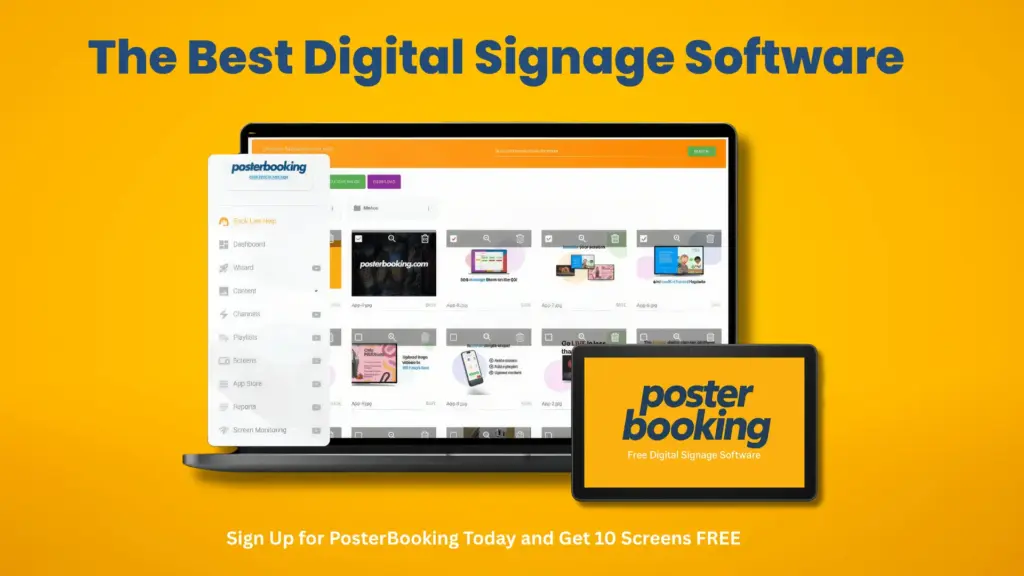
PosterBooking is the best signage app for a single screen or microbusiness because it offers free entry up to 10 screens, runs on standard Android devices, and supports offline cache. Runner-ups include OptiSigns for integrations and Yodeck for templates.
Table: Single-Screen Signage Apps
| App | OS Support | Free Tier | Offline Cache | Standout Feature |
|---|---|---|---|---|
| PosterBooking | Android | 10 screens | Yes | Cost-free starter |
| OptiSigns | Android, Windows | 1 screen | Yes | Broad integrations |
| Yodeck | RPi, ChromeOS | 1 screen | Yes | Rich templates |
Onboarding Tips for Single-Screen Apps include:
- Choose Android Box or Stick for Low Cost
- Preload Offline Cache Before Events
- Use Templates for Faster Setup
- Configure Autostart and Kiosk Mode
What Is the Best Digital Signage App for Schools & Nonprofits?
screencloud signage
ScreenCloud is the best signage app for schools and nonprofits because it integrates calendars, supports Chromebooks, and includes accessibility defaults. Yodeck is a strong budget-friendly runner-up with education discounts.
Education-Ready Features in Signage Apps include:
- Multi-User Roles for Faculty and Staff
- Calendar Integration with ICS/Google
- Accessibility Defaults for Captions and Contrast
- Content Moderation and Approval Workflows
- Cloud Support for Chromebooks
Governance Tips for School Signage include:
- Use RBAC to Separate Admin vs Teacher Roles
- Enable Approval Workflows for Announcements
- Audit Logs for Student Data Compliance
What Is the Best Digital Signage App for QSR Menus & Drive-Thru?
NoviSign is the best signage app for QSR menus and drive-thrus because it supports dayparting, CSV pricing sync, allergen callouts, and outdoor high-bright displays. Signagelive is a strong alternative for global franchises.
Spec Matrix: Menu Features in QSR Signage Apps
| Feature | NoviSign | Signagelive |
|---|---|---|
| Dayparted Menus | Yes | Yes |
| CSV/Spreadsheet Sync | Yes | Yes |
| Allergen Callouts | Yes | Limited |
| High-Bright Support | Yes | Yes |
Menu Board Checklist for QSR Signage Apps include:
- Support for Dayparted Loops
- Easy Price Updates via Spreadsheet
- Allergen and Nutrition Fields
- Outdoor Display Compatibility
- Grouped Screen Scheduling
What Is the Best Digital Signage App for Retail Promos & Shelf-Edge?
OptiSigns is the best signage app for retail promos and shelf-edge because it supports ultrawide displays, QR handoff, and basic POS sync. Yodeck offers tagging by store/aisle as a low-cost alternative.
Retail Features in Signage Apps include:
- Ultrawide/Bar Display Support
- QR Handoff for Promotions
- Tagging by Store and Aisle
- Basic POS Data Sync
- Remote Proof-of-Play
Retail Pitfalls in Digital Signage Apps include:
- Ignoring Ultrawide Aspect Ratios
- Lack of Tag-Based Targeting
- No Offline POS Sync
- Poor Proof-of-Play Logging
What Is the Best Digital Signage App for Corporate Dashboards & KPI TVs?
ScreenCloud is the best signage app for corporate dashboards and KPI TVs because it embeds authenticated dashboards securely, supports HTML5 widgets, and refreshes data at custom intervals. OptiSigns is a strong alternative with authenticated tokens for BI tools.
Table: Dashboard & Data Embed Capability in Signage Apps
| Feature | ScreenCloud | OptiSigns | Yodeck |
|---|---|---|---|
| HTML5 Widgets | Yes | Yes | Yes |
| Authenticated Embeds | Yes | Yes | No |
| Custom Refresh Control | Yes | Yes | Limited |
| Heartbeat/Uptime Alerts | Yes | Yes | Yes |
Key Features of Dashboard-Centric Apps include:
- Support for Authenticated Dashboards (Power BI, Tableau)
- HTML5 Widget Rendering for Data Feeds
- Uptime and Heartbeat Monitoring for Displays
- Custom Refresh Control for Live Dashboards
- Audit Logs for Security Compliance
What Is the Best Digital Signage App for Churches & Community Boards?
EasyWorship is the best signage app for churches and community boards because it offers announcement templates, volunteer-friendly UI, and simple recurring schedules. ScreenCloud is a good secondary choice for hybrid church/community spaces.
Features That Save Volunteer Time in Church Signage Apps include:
- Pre-Made Announcement Templates
- Volunteer-Friendly Drag-and-Drop Interface
- Media Library with Recurrence Options
- Low Admin Overhead and Training Requirements
- Mobile App for Quick Updates
Weekend Workflow for Church Signage Apps include:
- Prepare Announcements by Midweek
- Assign Volunteer Roles with Limited Permissions
- Use Recurrence for Weekly Events
- Push Emergency Notices via Mobile App
- Archive Weekly Playlists for Audit
What Is the Best Digital Signage App for Events, Pop-Ups, and Temporary Installs?
NoviSign is the best signage app for events and pop-ups because it supports offline-first operation, kiosk mode, and quick theming. Yodeck is another strong option for fast deployment with Raspberry Pi kits.
Table: Event Scenarios and Signage App Fits
| Event Type | Best App | Setup Time | Key Feature |
|---|---|---|---|
| Pop-Up Retail | NoviSign | <30 min | Offline-first |
| Temporary Exhibition | Yodeck | <45 min | Raspberry Pi kit |
| Outdoor Festival | OptiSigns | <30 min | LTE Failover |
Field Checklist for Event Signage Apps include:
- Preload Offline Cache Before Event Start
- Configure Kiosk Mode for Interactive Booths
- Test LTE/5G Failover for Outdoor Events
- Carry Portable Stands and UPS Units
- Apply Fast-Theming Templates for Branding
What Is the Best Digital Signage App for Android TV / Google TV Sticks?
PosterBooking is the best signage app for Android TV and Google TV sticks because it supports autostart, kiosk mode, and hardware acceleration. OptiSigns is a reliable second choice for stick-based deployments.
Table: Android Stick Compatibility in Signage Apps
| App | Kiosk Mode | Hardware Acceleration | Auto-Start | Watchdog |
|---|---|---|---|---|
| PosterBooking | Yes | Yes | Yes | Yes |
| OptiSigns | Yes | Yes | Yes | Yes |
| Yodeck | Partial | Limited | Yes | Yes |
Stick Device Hardening Steps for Android Signage Apps include:
- Enable Kiosk or Launcher Mode
- Activate Autostart on Boot
- Apply Hardware Acceleration for Video Playback
- Use Watchdog to Restart Crashed Apps
- Secure Device with PIN or MDM
What Is the Best Digital Signage App for Raspberry Pi & Linux?
Yodeck is the best signage app for Raspberry Pi because it offers optimized RPi images, 1080p and 4K playback support, and remote management. Screenly is an alternative for open-source lean deployments.
Table: Raspberry Pi Models and Viability for Signage
| Pi Model | Max Resolution | Codec Support | Recommended Use |
|---|---|---|---|
| Pi 3B+ | 1080p | H.264 | Budget installs |
| Pi 4 (2GB/4GB) | 4K30 | H.264/H.265 | Mainstream signage |
| Pi 5 (future-ready) | 4K60 | H.265/AV1 | Heavy media |
Pi Hardening Checklist for Digital Signage Apps include:
- Use Read-Only Filesystem for Stability
- Apply GPU Decode for H.264/H.265
- Configure Watchdog for Auto-Restart
- Secure SSH and Disable Unused Ports
- Remote Manage with VPN or MDM
What Is the Best Digital Signage App for Windows & macOS PCs?
OptiSigns is the best signage app for Windows and macOS PCs because it supports autostart, update control, and multi-display spans. NoviSign is another enterprise-ready option for desktop deployments.
Table: PC OS Kiosk Features for Signage
| OS | Autologin/Autostart | Update Control | Multi-Display Span | Notes |
|---|---|---|---|---|
| Windows 10/11 | Yes | Yes | Yes | Group policy friendly |
| macOS | Yes | Limited | Yes | Fewer MDM tools |
| Linux | Yes | Yes | Yes | Strong kiosk mode |
Admin Scripts for PC Signage Apps include:
- Configure Autologin and Auto-Start Scripts
- Disable Sleep and Power Saving Modes
- Apply Group Policy for Update Timing
- Use VNC/RMM for Remote Troubleshooting
- Harden Firewalls for Player Security
What Is the Best Digital Signage App for Interactive/Touch Kiosks?
NoviSign is the best digital signage app for interactive/touch kiosks because it supports touch targets, idle reset flows, and on-screen keyboards. OptiSigns is another strong option for kiosk deployments requiring privacy controls.
Spec Table: Kiosk Features in Signage Apps
| Feature | NoviSign | OptiSigns | Yodeck |
|---|---|---|---|
| Touch Target Optimization | Yes | Yes | No |
| On-Screen Keyboard | Yes | Yes | Limited |
| Idle Timeout Reset | Yes | Yes | Yes |
| Privacy/Data Capture Limits | Yes | Yes | Limited |
Touch Kiosk Features in Signage Apps include:
- Large Touch Targets for Accessibility
- On-Screen Keyboards for Data Entry
- Idle Timeout and Reset to Home Screen
- Privacy Controls for Data Collection
- Secure Kiosk Lockdown Mode
What Is the Best Digital Signage App for Video Walls & LED Walls?
ScreenCloud is the best digital signage app for video walls and LED walls because it handles canvas spanning, LED mapping, and synchronized playback. Yodeck is a lower-cost option for tiled LCD video walls.
Table: Wall Support in Signage Apps
| Feature | ScreenCloud | Yodeck | OptiSigns |
|---|---|---|---|
| Canvas Spanning | Yes | Yes | Yes |
| LED Mapping | Yes | No | Yes |
| Synchronized Playback | Yes | Yes | Yes |
| EDID Management | Yes | Limited | Yes |
Upgrade Triggers for Video Wall Apps include:
- Adding LED Mapping or Unusual Aspect Ratios
- Scaling Beyond Four Screens per Player
- Enabling High-Bitrate or 8K Content
- Synchronizing Across Multiple Controllers
What Is the Best Digital Signage App for Multi-Location Franchises?
Signagelive is the best digital signage app for multi-location franchises because it provides brand kits, approval workflows, audit logs, and API/webhook integrations. OptiSigns is a strong alternative for scaling quickly with simpler governance.
Table: Multi-Site Features in Signage Apps
| Feature | Signagelive | OptiSigns | Yodeck |
|---|---|---|---|
| Brand Kits | Yes | Yes | Limited |
| Approval Workflows | Yes | Limited | Yes |
| Audit Logs | Yes | Yes | No |
| API/Webhooks | Yes | Yes | Limited |
Scale Pitfalls in Multi-Site Signage Apps include:
- Inconsistent Brand Kit Enforcement
- Missing Approval and Moderation Steps
- Weak Audit Logs for Compliance
- Limited API Coverage for Integrations
What Is the Best Self-Hosted/Open-Source Digital Signage App?
Xibo is the best self-hosted/open-source digital signage app because it provides Docker support, plugin ecosystems, and active community updates. Screenly OSE is another option for lightweight Raspberry Pi networks.
Table: Open-Source Signage Apps
| App | Stack | Plugin Model | Security Posture |
|---|---|---|---|
| Xibo | Docker/MySQL/PHP | Yes | Active patches |
| Screenly OSE | Python/RPi | Limited | Smaller community |
Self-Host Readiness Steps for Open-Source Signage Apps include:
- Deploy via Docker for Portability
- Apply Regular Security Updates
- Test Backup and Restore Workflows
- Evaluate Plugin Ecosystem Support
- Assign IT Admin for Long-Term Maintenance
What Is the Best Digital Signage App for Low-Bandwidth or Offline-First?
Yodeck is the best digital signage app for low-bandwidth and offline-first deployments because it aggressively caches playlists, caps bitrates, and survives long outages. NoviSign is a strong secondary option for rural and transport networks.
Table: Offline Capabilities in Signage Apps
| Feature | Yodeck | NoviSign | OptiSigns |
|---|---|---|---|
| Aggressive Caching | Yes | Yes | Limited |
| Bitrate Caps | Yes | Yes | Yes |
| Sync Windows | Yes | Yes | Limited |
| Screenshot Audits | Yes | Yes | Yes |
Bandwidth-Saving Tips for Offline-First Signage Apps include:
- Preload Media During Low-Traffic Hours
- Enable Aggressive Caching by Default
- Apply Bitrate Caps to Large Files
- Run Screenshot Audits for Proof-of-Play
- Use USB or SD Fallback Where Possible
What Is the Best Digital Signage App for Privacy-Sensitive & Regulated Environments?
Signagelive is the best digital signage app for privacy-sensitive and regulated environments because it offers data residency options, least-privilege roles, and strong audit logs. Xibo is a viable self-hosted alternative for strict on-prem deployments.
Table: Security Baseline in Regulated Signage Apps
| Feature | Signagelive | Xibo | OptiSigns |
|---|---|---|---|
| Data Residency Options | Yes | Self-host | Limited |
| Audit Logs | Yes | Yes | Limited |
| Least-Privilege RBAC | Yes | Yes | Limited |
| On-Device Analytics | Yes | Limited | Limited |
Compliance Checklist for Privacy-Sensitive Signage Apps include:
- Ensure Data Residency in Required Region
- Apply Least-Privilege RBAC to All Users
- Maintain Audit Logs for 1–3 Years
- Disable Cloud Analytics Where Not Allowed
- Use Self-Hosting Where Regulations Demand
How Do the Top Digital Signage Apps Compare Feature-by-Feature?
The top digital signage apps compare feature-by-feature across layout flexibility, offline reliability, integrations, governance, and analytics. PosterBooking is strongest for microbusiness cost efficiency, Yodeck excels at Raspberry Pi deployments, ScreenCloud leads in dashboard/KPI support, Signagelive dominates enterprise governance, and NoviSign is best for QSR menus.
Wide Comparison Matrix of Digital Signage Apps
| Feature | PosterBooking | Yodeck | ScreenCloud | Signagelive | NoviSign | OptiSigns |
|---|---|---|---|---|---|---|
| Content Types (Image/Video/HTML5) | Yes | Yes | Yes | Yes | Yes | Yes |
| Layouts/Zones | Limited | Yes | Yes | Yes | Yes | Yes |
| Dayparting & Rules | Basic | Yes | Yes | Yes | Yes | Yes |
| Offline Cache | Yes | Yes | Yes | Yes | Yes | Yes |
| Remote Screenshots | No | Yes | Yes | Yes | Yes | Yes |
| Device Control (Power/Input) | No | Yes | Yes | Yes | Yes | Yes |
| Integrations/APIs | No | Limited | Strong | Strong | Medium | Strong |
| Proof-of-Play Analytics | No | Yes | Yes | Yes | Yes | Yes |
| Roles & RBAC | No | Limited | Yes | Yes | Limited | Yes |
| SSO/MFA | No | No | Yes | Yes | Limited | Yes |
| Approvals & Governance | No | Limited | Yes | Yes | Limited | Yes |
| Multi-Tenant | No | Limited | Yes | Yes | No | Yes |
| Video Wall Support | No | Yes | Yes | Yes | Yes | Yes |
| Accessibility Features | Basic | Yes | Yes | Yes | Medium | Yes |
| Alerts & Monitoring | No | Yes | Yes | Yes | Medium | Yes |
Red-Flag Omissions to Watch for in Signage Apps include:
- Missing Offline Cache in Cloud-Only Tools
- No RBAC for Multi-User Teams
- Weak API/Integration Coverage
- Lack of Accessibility Defaults
- No Proof-of-Play or Analytics
Which Content Formats and Widgets Matter Most?
The most important content formats for signage apps in 2025 are modern video codecs (H.265/AV1), HTML5 widgets, authenticated dashboards, and emergency alert feeds (CAP). Apps that only handle images and video are insufficient for enterprise use.
Table: Content Formats in Digital Signage Apps
| Format | Pros | Cons | Recommended Setting |
|---|---|---|---|
| H.264 Video | Universal | Higher bitrates | 8–12 Mbps |
| H.265/HEVC | Efficient, 4K-ready | Licensing costs | 5–8 Mbps |
| AV1 | Future-proof | Hardware limited | Experimental |
| HTML5 Widgets | Dynamic | Browser dependency | Test per app |
| RSS/JSON Feeds | Easy automation | Formatting issues | Cache for reliability |
| ICS/Calendar | Useful for schools/events | Time-zone issues | Sync daily |
| CAP Emergency Alerts | Standardized | Needs testing | Override priority |
What Scheduling, Rules, and Targeting Do You Actually Need?
The most critical scheduling and targeting rules in signage apps are loops with frequency caps, geo-targeted rules, and contextual triggers like weather or inventory. Over-engineered rule sets often cause more harm than good.
Table: Scheduling Rules in Digital Signage Apps
| Trigger | Rule | Example Content |
|---|---|---|
| Time of Day | Dayparting | Breakfast menu until 10:30am |
| Location | Geo-target | Local pricing for each region |
| Weather | Conditional | Ice cream promo on hot days |
| Inventory | POS-linked | Hide items when sold out |
| Frequency Cap | Max plays per hour | Limit ad repetition |
Scheduling Do’s and Don’ts for Signage Apps include:
- Use Dayparting for Meals or Shifts
- Apply Weather/Inventory Rules Only When Needed
- Cap Frequencies to Avoid Fatigue
- Always Configure a Fallback Playlist
- Test Rules in Staging Before Live Use
How Robust Are Device Management and Monitoring?
The most robust signage apps support heartbeats, screenshot audits, temperature monitoring, storage alerts, and remote reboots. Without these, operators cannot guarantee uptime across dozens or hundreds of devices.
Table: Device Control Features in Signage Apps
| Feature | Why It Matters | How to Test |
|---|---|---|
| Heartbeats | Confirms device alive | Kill network → check alert |
| Remote Screenshots | Confirms correct playback | Compare vs schedule |
| Temperature Alerts | Prevents overheating | Raise temp in test |
| Storage Alerts | Avoids media failures | Fill 90% → expect alert |
| Remote Reboot | Reduces truck rolls | Test remote power cycle |
| Version Pinning | Prevents update surprises | Push bad update → rollback |
What Security, Privacy, and Accessibility Practices Are Non-Negotiable?
The non-negotiable practices for digital signage apps are SSO/MFA, RBAC, signed updates, audit logs, network allow-lists, and accessibility compliance with captions and motion-safe defaults. Apps without these should be disqualified in regulated or enterprise contexts.
Hardening Checklist for Digital Signage Apps include:
- Enforce SSO and MFA for Admins
- Apply Least-Privilege RBAC Roles
- Require Signed and Tested Updates
- Maintain Audit Logs for All Changes
- Restrict Networks via Allow-Lists
- Use Privacy-First Analytics (No PII)
- Provide Captions, Contrast, and Motion Controls
Table: Security & Accessibility Requirements
| Requirement | Test | Pass Criteria |
|---|---|---|
| SSO/MFA | Login attempt | MFA enforced |
| RBAC | User role | Cannot exceed scope |
| Signed Updates | Patch test | Reject unsigned |
| Audit Logs | Change history | Immutable logs |
| Accessibility | Layout scan | Meets WCAG 2.1 AA |
Which Platforms and Devices Do the Best Digital Signage Apps Support?
The best digital signage apps in 2025 support Android, Windows, Linux, ChromeOS, macOS/tvOS, and Raspberry Pi, with strong parity across SoC displays and external players. Yodeck leads on Raspberry Pi, OptiSigns is strongest on Windows and Android, and Signagelive is best for multi-platform enterprise fleets.
Table: OS Platform Support in Digital Signage Apps
| App | Android | Windows | Linux | ChromeOS | macOS/tvOS | Raspberry Pi | SoC Displays |
|---|---|---|---|---|---|---|---|
| PosterBooking | Yes | Yes | No | No | No | Yes | Limited |
| Yodeck | Yes | Yes | Yes | Yes | No | Yes | Limited |
| ScreenCloud | Yes | Yes | Yes | Yes | Yes | No | Yes |
| Signagelive | Yes | Yes | Yes | Yes | Yes | Yes | Yes |
| NoviSign | Yes | Yes | No | Limited | No | No | Yes |
| OptiSigns | Yes | Yes | Yes | Limited | Yes | No | Yes |
Minimum Player Specs by Resolution for Signage Apps include:
- 1080p Playback: Dual-core CPU, 2 GB RAM, H.264 support
- 4K Playback: Quad-core CPU, 4 GB RAM, H.265 hardware decode
- 8K Playback: Octa-core CPU, 8 GB RAM, AV1 or HEVC decode
How Does Software Choice Affect Hardware (SoC vs External)?
Software choice affects hardware because some apps lock features behind SoC firmware, while others need external players for advanced codecs, LED mapping, or multi-display spans. For example, PosterBooking runs best on Android SoC, but Yodeck may require external Raspberry Pi or PC for advanced setups.
Table: Software Requirement vs Hardware Spec
| Requirement | Minimum Hardware Spec |
|---|---|
| HTML5 Widgets | 4 GB RAM, hardware-accelerated browser |
| Multi-Display Span | Dedicated GPU (NVIDIA/AMD) |
| 8K or HDR Video | Octa-core CPU, AV1/HEVC decode |
| LED Mapping | External player with multi-output GPU |
| RS-232/CEC/GPIO Control | Player with control ports |
If-Then Rules for Software-Hardware Matching include:
- If LED Wall, Ensure External Player with LED Mapping
- If 8K Playback, Ensure GPU with AV1 Support
- If SoC Deployment, Ensure OS Lock-In Is Acceptable
- If Multi-Display Span, Ensure PC or Workstation-Grade Player
- If Privacy Regulation, Ensure On-Prem Option Available
What Deployment Model Should You Choose - Cloud, On-Prem, or Hybrid?
Cloud is best for speed, scale, and low upfront cost; on-prem is best for regulated industries with strict compliance; hybrid is best when global reach meets data residency rules. Signagelive is strongest for hybrid and enterprise, Yodeck and ScreenCloud for cloud-first, and Xibo for on-prem/self-hosted.
Table: Deployment Models in Digital Signage Apps
| Model | Advantages | Trade-Offs | Best Fit |
|---|---|---|---|
| Cloud | Quick setup, SaaS cost | Vendor lock-in, data residency risk | SMBs, schools, retail |
| On-Prem | Compliance, full control | Higher IT burden | Healthcare, banking, defense |
| Hybrid | Mix of control + scale | Complexity, cost | Global enterprises |
Reference Architectures for Signage App Deployment include:
- Cloud-First SaaS with Mobile Admin
- On-Prem CMS with Local Players
- Hybrid Cloud CMS + Local Player Cache
- Edge-Cache Nodes for Latency Control
How Do Pricing and True TCO Compare Across Leading Apps?
Digital signage app pricing in 2025 ranges from free for small fleets (PosterBooking up to 10 screens) to $15–$30 per screen/month for enterprise SaaS (Signagelive, ScreenCloud). True TCO includes add-ons like SSO, API access, video wall licensing, and IT labor.
Table: Pricing Tiers in Digital Signage Apps
| App | Free Tier | Paid Range | Common Add-Ons |
|---|---|---|---|
| PosterBooking | Yes, 10 screens | N/A | Branding removal |
| Yodeck | Yes, 1 screen | $7.99–$12/screen | Video wall support |
| ScreenCloud | No | $20–$30/screen | SSO, dashboards |
| Signagelive | No | $25–$30/screen | APIs, SLA tiers |
| OptiSigns | Yes, 1 screen | $10–$15/screen | API/webhooks |
| NoviSign | Trial only | $18–$25/screen | Support SLAs |
TCO and ROI Considerations for Digital Signage Apps include:
- Calculate Screen Licensing vs Number of Devices
- Add API/SSO/Video Wall Costs if Needed
- Estimate IT Labor for Monitoring and Updates
- Include Bandwidth, Power, and Maintenance
- Consider Leasing/Annual Prepay for Discounts
When Is Upgrading or Paying More Actually Cheaper Long-Term?
Upgrading or paying more is cheaper long-term when it reduces truck rolls, energy usage, or downtime. Enterprise-grade apps like Signagelive often cut IT overhead with remote monitoring and SLAs, making them less costly than “free” apps that require constant manual fixes.
Table: Upgrade Cost vs Long-Term Savings
| Upgrade | Added Cost | Savings/Avoidance |
|---|---|---|
| SLA Tier | +$5/screen | -$100/truck roll |
| API Access | +$3/screen | -$1,000 IT labor/year |
| Video Wall License | +$5/screen | -$5,000 setup labor |
| Cloud Analytics | +$2/screen | -$500 manual reporting |
Upgrade Triggers in Digital Signage Apps include:
- Frequent Truck Rolls for Manual Fixes
- Rising Compliance or SLA Requirements
- Growing Fleet Beyond 50+ Screens
- Adding Video Walls or Advanced Displays
- Requiring Proof-of-Play for Advertising Revenue
How Do You Implement a Signage App Properly From Pilot to Scale?
The best way to implement a signage app properly is to follow a 90-day rollout: Discovery → Proof of Concept → Hardening → Initial Scale → Review. This phased approach reduces risk, validates stability, and builds governance before mass deployment.
Milestone Checklist for a 90-Day Digital Signage Rollout includes:
- Define Discovery Goals and KPIs
- Run 3–5 Screen Proof of Concept
- Enable Hardening (Policies, Alerts, Backups)
- Scale to 20+ Screens Across Sites
- Review and Adjust Based on Feedback
Table: Rollout Phase Risks and Mitigations
| Phase | Risk | Mitigation |
|---|---|---|
| Discovery | Over-scoping | Limit to key use case |
| POC | Offline failure | Test cache/playback |
| Hardening | Missing alerts | Configure SLA monitoring |
| Scale | Governance gaps | Enforce RBAC and approvals |
| Review | No iteration | Capture lessons and adjust |
What Should Your RFP and Scoring Rubric Include?
Your RFP should include must-have and nice-to-have features, security certifications, API proofs, SLAs, roadmap cadence, and references. The scoring rubric ensures vendors are compared fairly across weighted criteria.
Table: Sample RFP Scoring Matrix
| Criterion | Weight | Vendor A | Vendor B | Vendor C |
|---|---|---|---|---|
| Core Features | 25% | 4 | 5 | 3 |
| Security/Compliance | 20% | 5 | 4 | 4 |
| APIs/Integrations | 15% | 3 | 5 | 2 |
| UX/Ease of Use | 15% | 4 | 4 | 5 |
| SLA/Support | 15% | 5 | 3 | 3 |
| Roadmap Alignment | 10% | 4 | 3 | 5 |
RFP Questions to Ask Digital Signage Vendors include:
- What Proof of Security (Pen Tests, SOC2, ISO) Can You Provide?
- How Do You Handle Offline Playback and Cache?
- What SLAs Are Offered for Uptime and Support?
- How Often Do You Update Features and Fixes?
- Which APIs or Webhooks Are Available for Integration?
What Common Mistakes Derail App Rollouts - and How Do You Avoid Them?
The most common mistakes that derail app rollouts are skipping offline tests, assuming 4K without bandwidth checks, neglecting governance, and ignoring accessibility. Avoiding these requires discipline in staging, monitoring, and standards enforcement.
Top 12 Mistakes and Quick Fixes in Signage App Rollouts include:
- Skipping Offline Playback Tests → Pre-stage Cache in POC
- Assuming 4K Without Bandwidth Checks → Run Network Stress Test
- Ignoring Governance and Approvals → Enable RBAC and Workflow
- Overloading Layouts With Too Many Zones → Limit to 2–3 Zones
- Forgetting Accessibility → Apply Captions, Contrast, Safe Motion
- Not Testing Alerts → Configure and Simulate Device Alerts
- Ignoring Device Hardening → Enforce Kiosk Mode and Watchdog
- No Version Control on Content → Use CMS Approvals and Logs
- Assuming Free = Cost-Free → Calculate TCO Including IT Labor
- Not Planning Proof-of-Play → Require Analytics Setup from Start
- Overlooking Vendor Lock-In → Ensure Export/Backup Paths Exist
- Missing Multi-Location Variants → Use Tags and Targeting Rules
What FAQs Do Buyers Ask About the Best Digital Signage Apps?
The most common FAQs about digital signage apps cover resolution needs, offline reliability, OS stability, live data, accessibility, proof-of-play, and migration from legacy CMS.
FAQ for Digital Signage Apps include:
Do I Need 4K or Is 1080p Fine?
1080p is sufficient for most menus and dashboards; 4K is best for large walls.
Can It Run Reliably Offline?
Yes, leading apps like Yodeck and Signagelive cache offline for 24–48 hours.
Which OS Is Most Stable for 24/7 Use?
Linux and Android are most stable; Windows requires more patching.
How Do I Add Live Data Without Expensive Connectors?
Use JSON, RSS, or ICS widgets for cost-free integrations.
What About Accessibility and Captions?
ScreenCloud and Signagelive provide captioning and WCAG defaults.
How Does Proof-of-Play Work?
Apps log playback with timestamps, available in dashboards or export.
Which Apps Handle Video Walls?
ScreenCloud, OptiSigns, and Signagelive support synchronized walls.
How Do I Migrate from My Current CMS?
Export content, bulk-upload to new CMS, and stage test playlists.
What Support/SLA Differences Matter?
Enterprise-grade apps offer 99.9% uptime guarantees and 24/7 support.